How to stop your emails going to junk folder

Did you know that your emails may never reach your customers' inbox?
Spam filters do a good job of keeping junk out of inboxes however many companies get caught in the crossfire and their emails end up in the spam folder. If your customers don't see your emails, they can't open them, click on your call-to-action, which may result in non-payment of invoices or reminder letters.
So where do they go?
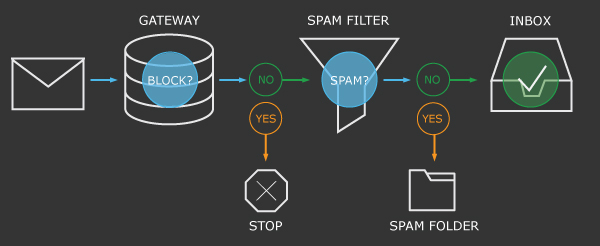
The below diagram shows each of the filters that a message encounters on its journey.
- Emails that are able to make it past both gateway and spam filters are delivered to the inbox.
- Emails that are deemed malicious or untrustworthy can be blocked at the gateway and not delivered to the inbox or spam folder.
- For emails that make it past the gateway, spam filters look at the reputation of the sender, user engagement, and content to decide if it should be placed in the inbox or the spam folder.
So what is spam and how can you avoid spam filters?
In the background, Utilmate uses an email platform called Sendgrid. Sendgrid sends 50 billion emails each month for over 80,000 customers including major players like Uber and Airbnb.
The single most important thing you can do to ensure the emails we send are trusted and not caught in spam filters for spoofing (us pretending to be you), is to add the below to your domain SPF record. Refer to Add SPF records to your domain for instructions on how to do this.
v=spf1 include:spf.protection.outlook.com include:sendgrid.net -all
- Most of our customer have already done this but if you haven't, your emails will likely be going to your customers' junk folder.
- If an email bounces, fix it - don't leave it bouncing each month as this negatively impacts your reputation.
- Inbox providers such as Microsoft, Gmail, and Yahoo all have their own spam filters which are different. Exactly how they identify spam emails is a closely guarded secret, however below are some common characteristics they look for:
- They check for user engagement. If emails are opened, replied to, not marked as junk, moved to another folder or added to their address book - this is a good reputation score. If emails are moved to the junk folder or deleted without opening - this is bad reputation score.
- They check the HTML email content. Below are some of the most important things to do (and not do) in your emails:
- Do include a clear unsubscribe link and a physical mailing address in your email footer.
- Allow people to view your email in a web browser.
- Don't use all capital letters and exclamation points.
- Avoid spelling mistakes.
Be assured we keep a close eye on this.
Utilmate has a 99% rating for delivering emails into inboxes. This rating is measured over a 30 day period and means 1% of emails sent either bounced or were marked as spam by a customer. In Utilmate's case, we've had 0 customers mark our emails as spam.
Comments
0 comments
Article is closed for comments.